A custom desk mat is one of the few accessories where the specification matters more than the artwork. A beautiful print on a mat that is too small to hold your keyboard, or so thin you feel every ridge of the desk beneath it, is a daily irritation rather than an upgrade. Two numbers decide whether a mat works: its footprint and its thickness. Get both right and the mat disappears under your hands the way a good one should. Here is how to choose them before you worry about the design.
Width: fit the keyboard and the mouse
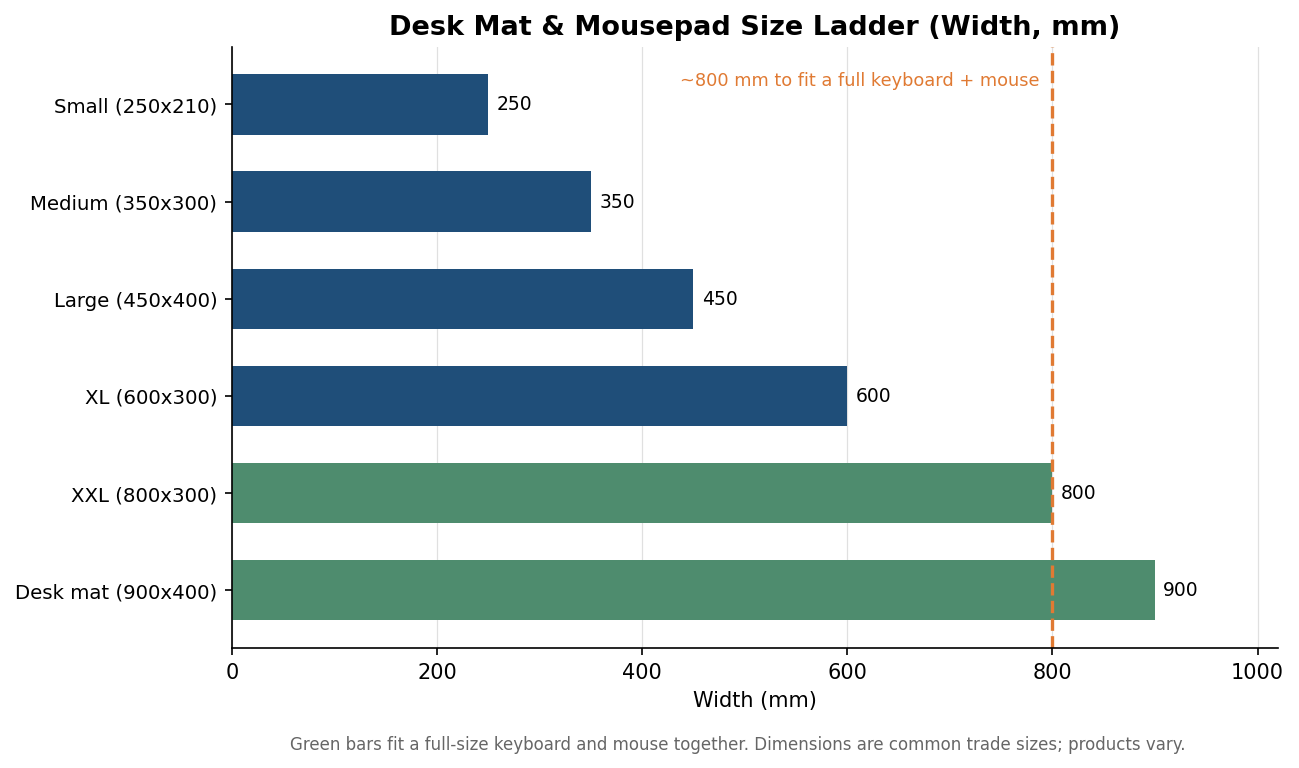
Desk mats and mousepads follow a well-established size ladder. Mouse-only pads run from a small 250 by 210 mm up through a large 450 by 400 mm and extended gaming formats like 600 by 300 mm and 800 by 300 mm. The moment you want the keyboard on the mat as well, width becomes the deciding number. A full-size keyboard is roughly 450 mm wide, so a mat needs at least about 800 mm of width to seat the board and still leave usable mouse room beside it. That is why the classic “desk mat” size is 900 by 400 mm, around 35 by 16 inches: it is the smallest footprint that comfortably holds a full keyboard and a freely moving mouse. If you run a compact or 60 percent keyboard you can drop to a narrower mat, but for a standard board, 800 mm is the practical floor.
Depth: match the desk, not just the monitor
Width gets the attention, but depth decides how the mat sits. A 400 mm-deep mat covers the space from the front edge back to roughly where a monitor stand begins on a typical desk, giving you a continuous surface for wrists, keyboard, and mouse. Measure your desk’s depth before ordering. A mat deeper than the desk will either hang off the front or ride up the monitor riser at the back, and one much shallower leaves the front lip of the desk exposed right where your wrists rest. For dual-monitor or unusually deep desks, oversized mats above 900 mm wide exist, but check that the back edge clears your stands and cable tray. The goal is a mat that ends where the usable desk ends, not one that fights the furniture. As a quick check, most standard desks are around 600 to 750 mm deep, so a 400 mm mat leaves a comfortable band of bare desk behind it for a monitor arm or a stand, while shallower desks may want you to push the monitor onto a riser to keep the mat flat.
Thickness: how firm should it feel
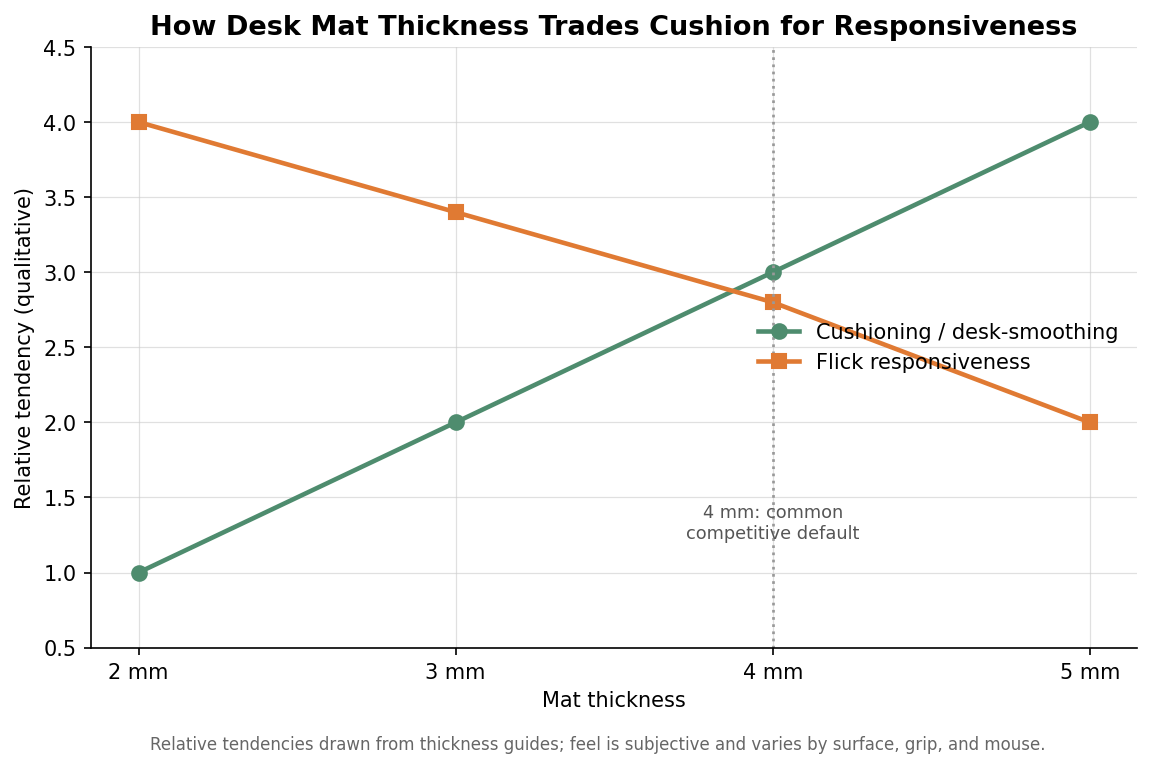
Thickness is measured in millimeters and changes the feel more than any other spec. A 2 mm mat is hard and responsive but transmits the texture of the desk beneath it, so on a grainy wood surface you will feel the grain through it. 3 mm is the baseline, with a little give. 4 mm is the sweet spot most competitive pads default to, adding a moderate cushion and damping desk imperfections while staying responsive under a fast mouse. 5 mm is the plush end: maximum cushioning and the best at smoothing an uneven desk, but the extra sink can make quick mouse movements feel slightly sluggish. Counterintuitively, deeper cushioning is not automatically kinder to your wrist, because a mat you sink into takes more effort to stay stable on. For a mixed office-and-gaming setup, 3 to 4 mm suits most people; go thicker only if your desk surface is rough or you specifically want a soft rest. Thickness also affects how the mat lives day to day: thinner mats roll up tightly and travel well, while thicker ones lie flatter out of the box and resist curling at the corners, which is part of why a stitched edge and a full rubber base matter more as the mat gets thicker.
Putting size and thickness together
The right combination depends on the job. For an office or work-from-home desk, a 900 by 400 mm mat at 3 to 4 mm gives full coverage, a comfortable wrist surface, and a large printable area for a subtle brand or design. For gaming, size follows sensitivity: low-DPI players sweep the whole mat and want the 800 mm-plus width, while 4 mm balances control and speed. For branded and onboarding kits, the full-desk 900 by 400 size is the most valuable real estate, because it stays on the desk in view all day; a 3 to 4 mm mat with a stitched edge and a grippy rubber base survives daily use and ships flat or rolled. Whatever the use, decide the footprint from what has to sit on the mat and the thickness from how firm you want it to feel, then let the artwork fill the space you have chosen rather than choosing a size to fit the artwork. It also helps to design with the seams and corners in mind, keeping important logos or text away from the very edge where a stitched border and the natural curve of the corner sit.
A desk mat is bought for its print but lived with for its dimensions. Size it to hold your keyboard and mouse with room to move, match its depth to your actual desk, and pick a thickness that suits your surface and your hands. Do that and the mat becomes the quiet foundation of the setup, and the print you chose gets to sit on a mat that actually works.