Custom Desk Mat Mistakes: What Goes Wrong on a First Order
The biggest mistakes on a first custom desk mat order are picking a size before measuring desks, hiding the logo under the keyboard, choosing the wrong surface, sending low-resolution artwork and rushing the mockup. Customized Desk Mats returns a free mockup within 24 hours with unlimited revisions, so each of these desk mats problems can be caught before production.
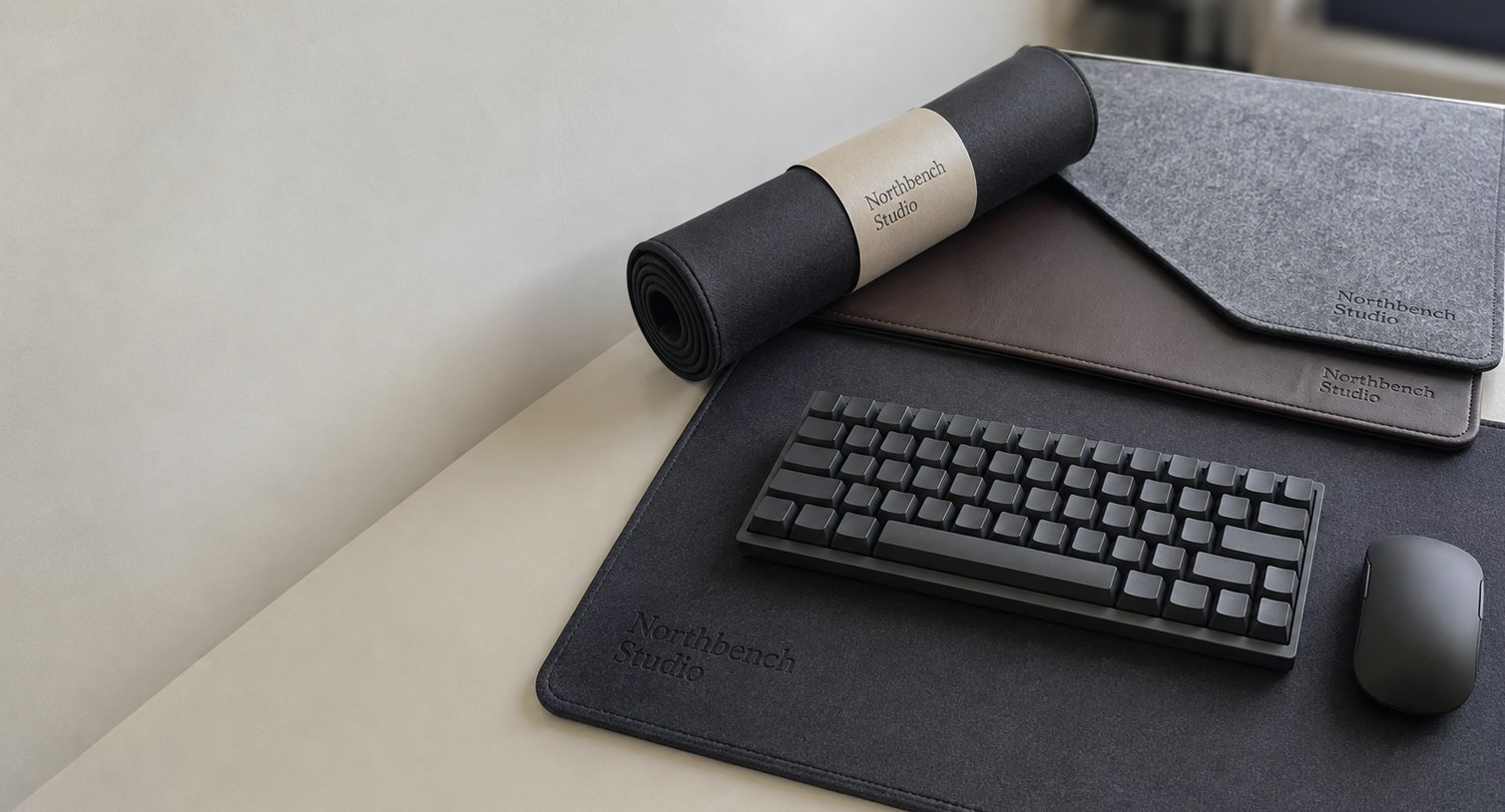
- Measure real desks before choosing a mouse mat or full-desk mat
- Keep logos out of the keyboard zone and fine detail out of the mouse path
- Send vector logos and named brand colors
- Free mockup within 24 hours, unlimited free revisions, pay nothing until you approve
- Minimum order is 12; standard turnaround is about 2 weeks after approval
What are the most common mistakes on a first custom desk mat order?
The most common first-order mistakes with custom desk mats are choosing a size before measuring the actual desks, placing logos where the keyboard will cover them, picking a surface that does not suit the way people work, and approving the mockup too quickly. Every one of these is easy to avoid if you know to look for it before you sign off on the design.
None of these problems come from the printing itself. They come from decisions made early in an order, usually by someone who has never bought desk mats in bulk. A desk mat lives flat under a keyboard, a mouse, a laptop and a coffee cup every working day, so small layout and material choices show up quickly once the mats are in use.
Customized Desk Mats returns a free mockup within 24 hours and allows unlimited free revisions, and you pay nothing until you approve the design. That gives you room to catch every mistake below on screen rather than on a desk. The sections that follow walk through each one, what it looks like in practice, and the simple check that prevents it.
Why does choosing the wrong desk mat size cause problems?
Choosing the wrong desk mat size causes problems because a mat that is too large hangs over the desk edge and curls, while a mat that is too small leaves the mouse running off onto bare desk. The fix is to measure the real desks, monitor arms and keyboard trays your people use before picking between a mouse mat and a full-desk mat.
Many buyers pick a size from a photo that looked good, then discover their office uses narrow sit-stand desks, L-shaped corner desks or shared benching. A full-desk mat that suits a wide gaming setup can crowd a compact workstation, and a mouse mat can feel lost on a large executive desk.
- Measure a few typical desks rather than the biggest one in the building.
- Check what sits on the desk permanently, such as monitor stands, docking stations and desk lamps.
- Consider keyboard trays, which often make a mouse mat the better choice.
If you are unsure, the full-desk printed mats and stitched-edge mouse mats pages show how the two formats sit on a desk, and the mockup can be shown at the size you choose.
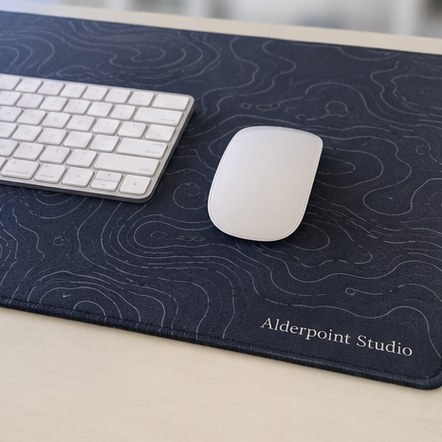
Where should a logo go on a custom desk mat so people actually see it?
A logo on a custom desk mat should go where nothing permanently covers it, which usually means a top corner, the far left side, or the outer edge of the mouse zone. Centering a logo on a full-desk mat is the single most common layout error, because the keyboard sits directly on top of it from the first day.
Think of a full-desk mat as having three zones: the keyboard zone in the middle, the mouse zone on the right for most people, and the open areas at the top and left that stay visible. Artwork in the open areas gets seen every time someone sits down. Artwork in the keyboard zone is seen only when the desk is cleared.
The same thinking applies to fine detail. Small taglines, website addresses and thin script fonts placed under the mouse path are harder to read once a mouse is moving over them all day. Keep the mouse zone calm, with a solid color or a simple pattern, and put the detail where eyes rest. A good mockup review means picturing the keyboard, mouse and laptop sitting on the design, not admiring the artwork on its own.
Which desk mat surface should you choose for how your team works?
The right desk mat surface depends on how your team uses the desk: printed fabric suits mouse-heavy work and bold full-color artwork, leather and PU desk pads suit writing and formal offices, and felt or wool pads suit quiet, minimal workspaces. Picking a surface only for its look, without thinking about daily use, is a frequent first-order regret.
| Surface | Best for | Watch out for |
|---|---|---|
| Printed fabric (full-desk or mouse mat) | Full-color artwork, gaming, design and mouse-heavy roles | Placing fine detail under the mouse path |
| Leather and PU | Executive offices, writing, client-facing desks | Expecting photo-style full-color artwork |
| Felt and wool | Calm, minimal workspaces and studio desks | Busy designs that fight the texture |
| Front-desk and counter mats | Reception and service counters | Using a desk-style mat on a counter |
For a closer look at each option, see leather and PU desk pads, felt and wool desk pads and front-desk and counter mats.
What artwork mistakes make a printed desk mat look blurry or off-color?
Printed desk mats look blurry or off-color most often because the artwork was a small web image stretched to full-desk size, because brand colors were sent as a screenshot rather than defined values, or because important text sat too close to the edge. Sending vector logos and stating your brand colors avoids most of these issues before the mockup stage.
A full-desk mat is a large canvas. A logo pulled from an email signature or a social profile may look sharp on a phone but soften badly when enlarged across a desk. Vector files such as AI, EPS, SVG or a vector PDF scale cleanly. For photographs and illustrations, send the largest original file you have.
- Send vector logos whenever they exist.
- Name your brand colors using the values in your brand guide, so the mockup starts from the right reference.
- Keep text and logos away from the edge, especially on stitched-edge mats where the stitching wraps the border.
- Remove backgrounds you do not want printed, such as white boxes behind a logo on a dark design.
If you only have a low-resolution file, say so. Customized Desk Mats will flag it on the mockup rather than printing a soft image.
Why do stitched edges matter so much on a custom desk mat?
Stitched edges matter on a custom desk mat because the edge is where daily wear starts: wrists drag across it, chairs bump it, and an unfinished edge can fray or lift over time. Skipping stitched edges to keep a design borderless is a common mistake on mats meant for heavy daily use.
Stitching wraps the outer border, so any artwork that runs right to the edge will meet the thread. Plan for that by keeping logos and text inside the border and letting background color or pattern run underneath the stitching. Done this way, the stitched edge frames the design rather than cutting into it.
Stitched edges are most valuable on mats for offices, computer labs, onboarding kits and gaming setups, where the same mat sees long hours every day. For a short-term event giveaway the trade-off may be different, which is worth raising when you request a quote. The stitched-edge mouse mats page shows the finished edge up close.
How should you review a desk mat mockup before approving it?
You should review a desk mat mockup by checking it against the real desk, not just the screen: confirm the size, picture the keyboard and mouse sitting on the design, read every word for spelling, and check that colors match your brand guide. Approving a mockup in a few seconds because it looks good is how avoidable mistakes reach production.
- Confirm the format and size match the desks you measured.
- Place imaginary objects on the layout: keyboard in the middle, mouse on the working side, laptop or notebook where people really put them.
- Proofread everything, including small print, website addresses and any names.
- Compare colors to your brand values, keeping in mind that screens vary.
- Check the edges so nothing important sits where stitching will run.
- Ask a second person who uses the same kind of desk to look at it.
Revisions are unlimited and free, so asking for one more change costs nothing but a day. Customized Desk Mats starts production only after you approve, which means the mockup is your last and best chance to catch a problem.
Which planning mistakes cause desk mats to arrive late?
Desk mats arrive late most often because the order was started after the deadline was already tight, because artwork approval stalled waiting on internal sign-off, or because the delivery address and contact were not settled up front. Standard turnaround is about 2 weeks after approval, so the clock really starts when the mockup is approved, not when you first ask.
For onboarding programs, office moves and event kits, decide who approves the design before you request a quote. A mockup that arrives within 24 hours does not help if it then waits a week for a manager to review it. Gather logos, brand colors and the delivery details in one message so the first mockup is close to final.
If the date is fixed, mention it in your request. Faster turnaround is available with express shipping, and the team can tell you early whether the date is comfortable. For kits that include desk mats alongside other items, the corporate sets and onboarding kits page explains how those orders are put together.
What should a first-time buyer check before placing a desk mat order?
A first-time buyer should confirm a few things before ordering custom desk mats: the format and size that fit the real desks, the surface that suits the work, artwork files that will print sharply, a layout that keeps logos visible around the keyboard and mouse, and a realistic date that allows for approval plus about 2 weeks of production.
- Format chosen after measuring desks, not from a photo.
- Surface matched to the job: fabric, leather and PU, felt and wool, or counter mat.
- Vector logo and named brand colors ready to send.
- Logos in visible zones, calm artwork under the mouse.
- Stitched edges on mats meant for daily use.
- One named approver and a confirmed delivery address.
The minimum order is 12 desk mats, so a first order can be a sensible pilot before a larger rollout. When you are ready, request a custom quote and see how it works from mockup to delivery.
Frequently asked questions
Can I see how a custom desk mat will look on my own desk before ordering?
Custom desk mats from Customized Desk Mats come with a free digital mockup within 24 hours, shown at the size and format you choose. You can ask for the layout to show where the keyboard and mouse will sit, then request changes until the placement feels right. Revisions are unlimited and free, and nothing is charged until you approve the final design.
Should a desk mat logo sit in the center or in a corner?
Desk mat logos usually work best in a top corner or along the left side, where nothing covers them during the workday. A centered logo on a full-desk mat ends up hidden under the keyboard most of the time. Corner and edge placements stay visible every time someone sits down, which is the whole point of a branded mat.
What file format gives the sharpest print on a full-desk mat?
Full-desk mats print sharpest from vector artwork such as AI, EPS, SVG or a vector PDF, because vector files scale to any size without softening. For photos or illustrations, send the largest original file available rather than a copy saved from a website. Customized Desk Mats will point out any file that looks too small on the mockup.
Can a desk mat design run all the way to the stitched edge?
Desk mat backgrounds and patterns can run right to the stitched edge, but logos and text should stay inside the border. Stitching wraps the outer edge of the mat, so anything important placed there can be partly covered by thread. Keeping a small clear margin lets the stitching frame the design neatly instead of cutting through it.
Is a leather desk pad a good choice for heavy mouse use?
Leather and PU desk pads suit writing, laptops and formal offices well, while printed fabric mats are often the more comfortable choice for mouse-heavy roles such as design, analytics and gaming. Many teams pair the two styles for different desks. Customized Desk Mats can suggest the better surface once you describe how each group of people works.
How do I stop brand colors shifting on printed desk mats?
Printed desk mats hold brand colors best when you send defined color values from your brand guide instead of a screenshot or a photo of a previous item. Those values give the mockup a precise starting point. Screens display color differently, so compare the mockup against your guide rather than judging it on one monitor alone.
Who should approve a desk mat mockup inside a company?
Desk mat mockups move fastest when one named person has final approval and has seen the brand rules in advance. That person should also check the size against real desks and proofread every word. Settling the approver before requesting a quote keeps the 24-hour mockup from waiting days for sign-off, which protects your delivery date.
Can different departments get different desk mat layouts in one order?
Desk mat layouts can vary between departments as long as each design meets the minimum order of 12. Teams often keep the same logo placement and change only colors, taglines or the surface style. Customized Desk Mats will prepare a mockup for each version so every department signs off on its own layout before production starts.
Do stitched edges make sense on desk mats used as event giveaways?
Stitched-edge desk mats make the most sense where a mat sees long daily use, such as offices, labs and gaming desks. For an event giveaway, stitched edges still add durability and a finished look that recipients notice, so many buyers keep them. Mention how the mats will be used when you request a quote and Customized Desk Mats can advise.
What should I write in a desk mat quote request to avoid back-and-forth?
Desk mat quote requests work best when they list the format, surface, rough quantity, your logo files, brand colors, the deadline and the delivery location in one message. That gives Customized Desk Mats everything needed for a first mockup that is close to final. Missing details are the main reason quotes and mockups need extra rounds.
Can I order a small pilot run of desk mats before a company-wide rollout?
Desk mat pilot runs are a sensible way to test size, surface and logo placement before ordering for a whole company. The minimum order is 12 per design, which is enough to put mats on a few desks and gather honest feedback. Once the pilot proves the layout, the same approved design can be reordered at a larger quantity.
Get a free mockup for your desk mats
Send your logo or idea and the quantity you have in mind. Customized Desk Mats returns a free mockup within 24 hours, you approve the design before anything is produced, and standard turnaround is about two weeks with faster options available. Get a custom quote.